Multifunction Printers & Copiers
We're Atlantic Canada's only PROs Elite 100 certified dealer.
PROs Elite 100 is an independent, third-party designation awarded the top 100 performing imaging dealers. Office Interiors was the first of four Canadian dealers to earn the certification and is the only certified dealer in Atlantic Canada. Earning it requires demonstrated excellence in service metrics, technician training, and customer satisfaction.

Print, copy, scan, and manage documents more efficiently.
Whether your business depends on high-volume black and white printing or high-quality colour printing, choosing the right office copier or multifunction printer (MFP) has a direct impact on your costs, productivity, and workflows.
What is a Multifunction Printer MFP) or Office Copier?
A Multifunction Printer (MFP) or copier is an all-in-one office machine that consolidates printing, scanning, copying, and faxing into a single device. Also known as an all-in-one (AIO) printer or multifunction device (MFD), it reduces costs, saves office space, and streamlines workflows by combining multiple functionalities.
Key Multifunction Printer Features for Office Productivity
Modern MFPs can be customized to match your workflows, security requirements, print volumes, scanning needs, and office productivity goals. From cloud connectivity to advanced finishing, here are some of the most popular features businesses look for in office copiers.
Automatic Document Feeder (ADF)
Crucial for high-volume jobs, an ADF allows users to place a stack of documents into a tray for automatic copying, scanning, or faxing without manual intervention. Single-Pass Duplex Scanning & Printing also increases speed and helps save on paper costs.
Advanced Finishing Capabilities
Automatic stapling, hole punching, booklet-making, and folding save significant time and manual effort, producing professional-grade documents in-house.
Mobile/Remote Printing
Print securely from smartphones, tablets, laptops, or remote locations.
Optical Character Recognition (OCR)
Converts scanned paper documents into searchable and editable digital text files (PDF, Word, Excel).
Scan-to-Email/Folder/Cloud:
Scans documents directly into digital workflows (like email, shared servers, or cloud storage) to reduce paper dependency.
User Authentication/Secure Print Release
Requires a PIN or ID card to release print jobs, ensuring sensitive documents are not left in the tray. Learn more about copier security features.
How to Choose the Right Copier or MFP for Your Business
The right multifunction printer for a 5-person law firm looks very different from what a 200-person organization needs. Before you start comparing brands and specs, answer these six questions first.
Speak to a Copier Expert Inkjet vs. Laser: Which Do You Need?What do you actually need it to do?
Print only, or print, copy, scan, and fax? Do you need colour output, finishing options like stapling or booklet-making, or a smart device that can read text with OCR?
How much will you print each month?
Every MFP is engineered for a specific monthly print volume. As a rule of thumb: 4,000–7,000 pages/month suits a 25 ppm device; 20,000+ pages/month typically requires 50 ppm or more.
What is your budget to purchase a copier?
Commercial-grade copiers range from $7,500 to $25,000. But the purchase price is only part of the picture. Factor in toner, maintenance, and whether buying outright or leasing makes more sense for your cash flow.
Who's handling service and supplies?
Ask any prospective vendor: What's your average response time? How do I reorder toner? Do you offer automatic fulfilment? A great copier with poor local support is a liability, not an asset.
Will it work with your existing systems?
Mac or PC? Cloud-based workflows? On-premise servers? Compatibility determines whether all the features you're paying for actually function in your environment from day one.
Colour or black and white?
If most of your documents are internal (reports, contracts, memos), a monochrome MFP will cost significantly less per page. If you're producing client-facing materials or marketing collateral in-house, colour is worth the investment.
How Much Does a Multifunction Printer Cost?
In the broadest sense, a commercial-grade MFP could cost anywhere from $7,500 to $25,000, but a vast range doesn’t help you budget how much you need to buy your business a new device.
The primary factor that most impacts your final price is how many pages you intend to print every month (your monthly printing “volume”).
Here are the four main categories of devices we find our customers using as well as their approximate costs.
-
25 ppm MFD – $7500 to $11 000
-
30 ppm MFD – $10 500 to $14 500
-
45 ppm MFD – $12 500 to $18 000
-
60 ppm MFD – $14 000 to $22 000
What to Look for in a Copier Service Provider
A great MFP dealer does more than deliver a device. The right provider responds fast when something breaks, stocks parts before you need them, holds the certifications to service what they sell, and proactively helps you control costs. Most businesses only discover their dealer falls short after they've already signed a contract.
At Office Interiors, we're proud to meet every one of these standards - independently verified through PROs Elite 100 certification, the highest service designation in the North American office technology industry.

Verified reputation
Online reviews tell part of the story. Third-party certifications tell the rest. Ask any prospective dealer how they measure their own performance and whether someone outside their company verifies it.
Local response times
Any quality provider should be able to tell you their average response time for your specific location. If they can't, that's your answer.
Authorized to service what they sell
Manufacturer authorization matters. It affects your warranty, your parts access, and the quality of every service call. Confirm it before you commit.
Active cost management
The best providers aren't waiting for something to break. They're tracking your usage, flagging inefficiencies, and helping you spend less, not just showing up when called.
Dedicated to Providing World-Class Service
At Office Interiors, we make it our mission to provide our customers with superior service so your business can run smoothly with minimal downtime.
• 3 Hour Average Response Time
• 87.8 Net Promoter Score (NPS)
• 90% First Call Effective Rate
Real Results
Legal

''The team is professional and explains the pros and cons and why they recommend a product or service so that you, as the client, can make an informed decision. They are quick to help us with our phones or fax/copier as needed. Very knowledgeable and patient; explains concepts and solutions well and ensures that you, as the client, understand a product's functions and how to use them as easily as possible.''
Jennifer Donovan | Founder and CEO | J. Donovan Law Group

Education

Office Interiors manages and services over 650 print equipment across 13 locations, including production printers, multifunction printers, and standard office printers.
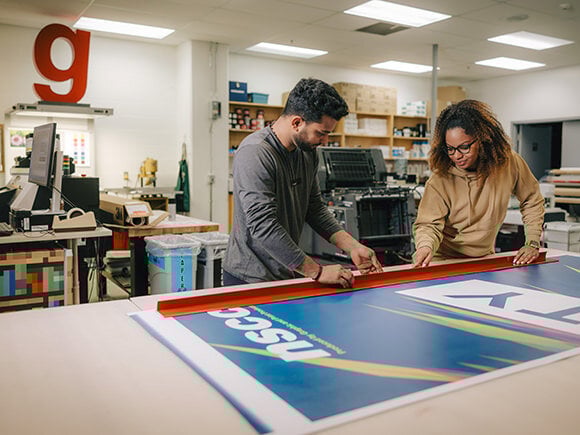
Beyond everyday printing, NSCC students gain hands-on experience in their campus print shops, utilizing Ricoh production devices to learn, design, and create professional-quality materials.
Not-for-profit

Office Interiors manages and services over 300 devices, including production printers, multifunction printers, and standard office printers, across multiple Medavie Blue Cross locations in Canada. These devices support essential operations such as secure claims processing, document management, and daily business communications.

FAQs
Below are answers to some of the most frequently asked questions about multifunction printers/copiers that will help you make an educated and informed decision.
What is a multifunction printer (MFP) and how is it different from a regular printer?
Modern multifunction printers (MFPs), also known as copiers, are devices that can copy, print, scan and (usually) fax, though they are used most often for the printing of office documents.
Is leasing or buying an MFP better for my business?
The upfront cost of buying is higher while leasing allows you to spread out smaller payments over time which may be more budget or cash-flow-friendly for companies with slim budgets. Whether you should buy or lease your device depends on the needs and requirements of your organization. Here are some considerations to help you decide.
What’s the difference between an inkjet and a laser MFP?
Inkjet printers use liquid ink for vibrant colours and high-quality images, making them ideal for photos and creative work. Laser printers use toner powder and heat, delivering faster, sharper text for high-volume business printing. Read more about the differences here.
Do I need a colour or black & white MFP for my office?
Black and white printing costs up to four times less per page than colour and prints faster, making it the default choice for high-volume offices. Colour is worth the cost when your output is client-facing, branded, or visual. Most businesses need both. To help you make an informed decision, check out:
5 Key Factors to Consider Before Buying a Colour Copier/MFP
Top 4 Challenges of Using a Monochrome (Black & White) Copier/MFP
What kind of warranty comes with a multifunction printer?
Most multifunction printers (MFPs) come with a standard manufacturer’s warranty covering defects in materials and workmanship for 90 days to one year. However, consumables like toner and drums are typically excluded. Businesses looking for long-term coverage and maintenance often opt for extended warranties or service agreements.
For a deeper dive into MFP warranty coverage, exclusions, and fine print, check out our full guide here.
Does Office Interiors provide local service & support for MFPs?
Yes! We have dedicated service team members in every city where we operate, including Halifax/Dartmouth, Sydney, Moncton, Fredericton, and Bathurst. Additionally, we have remote service technicians based in Bridgewater, Annapolis Royal, Antigonish, New Glasgow, Charlottetown, Summerside, Saint John, Miramichi, and Edmundston. With a strong presence across Nova Scotia, New Brunswick, and Prince Edward Island, our expert technicians ensure fast, reliable service to keep your office equipment running smoothly. We're a certified Pros Elite 100 Dealer and have been recognized as a 'World Class Service Provider' by NPS Calculator, CEO Juice.
Serving Businesses Across Atlantic Canada
Office Interiors provides copier/ MFP sales and service across Nova Scotia, New Brunswick, and Prince Edward Island with dedicated offices in six cities and certified technicians dispatched from communities throughout the region.
Multifunction Printers in Halifax & Dartmouth
Nova Scotia
Multifunction Printers in Sydney
Nova Scotia
Multifunction Printers in Moncton
New Brunswick
Multifunction Printers in Fredericton
New Brunswick
Multifunction Printers in Bathurst
New Brunswick
Multifunction Printers in Charlottetown
Prince Edward Island
Remote service technicians also dispatched to Bridgewater, Annapolis Royal, Antigonish, New Glasgow, Summerside, Miramichi, Edmundston, and Saint John.
Ready to Find the Right MFP for Your Business?
One conversation is all it takes. Our technology specialists will assess your print environment, match you to the right device, and give you a no-obligation quote so you can move forward with complete confidence.
Fill in the form on the right to request a free office technology consultation.